Serve customers in Pet Store Tycoon: stock shelves before the rush, restock food and toys, and ring up sales to keep shoppers from leaving.
How to Serve Customers in Pet Store Tycoon
Keep the shelves full before shoppers arrive, refill food and toys as they run low, and stand near the register so every sale is rung up quickly. Happy pets keep the loop fed, so feed, clean and play with them between orders. Serving is the whole job: the store earns nothing while a customer waits.
What serving a customer actually is
The official description gives the job in five words: "Stock your shelves and serve customers." A shopper walks in, browses the shelves, picks up what is on them, and pays at the register. There is no separate serving minigame to learn, and there is no queue timer you can inspect. The sale either happens on that short path or it does not happen at all.
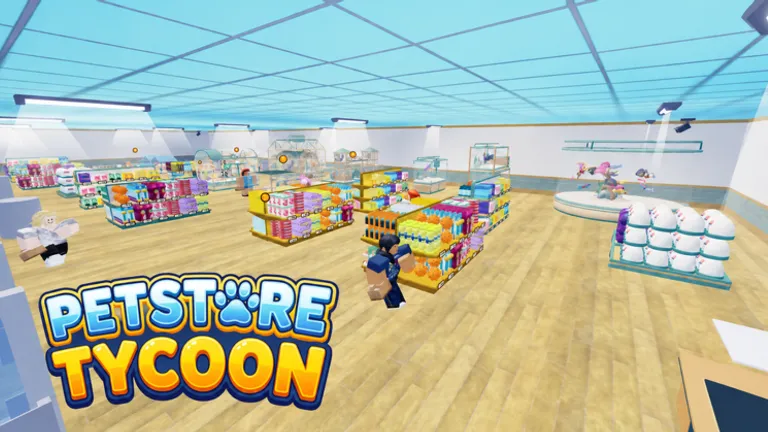
The checkout in game looks like a supermarket lane, with a conveyor belt and shopping baskets, which tells you how the developer expects traffic to move. Shoppers arrive, the lane advances, the sale closes. Your half of that is keeping both ends of the lane working: the shelves fed, and the register manned.
One framing point from the coverage around the game's launch is worth holding on to. The earning loop is described as serving customers and selling animals. Serving shoppers is the recurring income that pays your bills; selling pets is the milestone income that pays for expansions. Both run through the same shop, so a dead aisle costs you twice over.
Official source: Pet Store Tycoon on Roblox - the official description sets out the whole loop: "Feed, clean, and play with your pets", "Stock your shelves and serve customers", "Unlock new animals and expand your store" and "Decorate your shop and make it your own".
This page covers the 2026 remake by already arrived studios, placeId 118845698633260. An older game with the identical name by DantesDivine, placeId 5254674128, has not been updated since August 2025 and plays differently, including a "feed, walk, and play" loop the remake's description does not mention. Old 250-coin code lists circulating online belong to that older listing.
Stock the shelves before the rush
Empty shelves are the most common reason a shopper walks out with nothing. Restocking costs money and time, so it competes with everything else you could be doing, and the order the official description lists things in is a usable priority list in itself: care first, then stocking, then serving. A store that buys stock it has nowhere to place, or food it cannot feed, is a store that stalls.
Three habits hold up better than any specific shopping route:
- Walk every shelf before you go off to play with pets, not after.
- Refill the fast-moving food rows first, because those are what a shopper grabs on autopilot.
- Keep a little cash back after each restock so one bad order does not force you to sell an animal you wanted to keep.
Pet Store Tycoon does not publish stock costs, shelf prices or payout numbers anywhere public. Treat any specific price on a third-party page as a guess, including the ones that look authoritative. What is verifiable is the shape of the loop: the description puts stocking ahead of serving, and serving is what pays.
With up to eight players in one server, one person can refill while another holds the register. The store never stops earning that way, and the register queue is the one thing you cannot afford to leave unattended.
Hold the register, and keep the pets happy
Standing near the lane is most of serving. The failure mode is not a hard mechanic, it is you wandering off to decorate while a shopper stands at the checkout waiting and eventually leaves. The game's own layout points the same way as the description: keep the shelves a short walk from the register, and keep the register watched.
The income side of this is covered in detail on the money page, but the short version is that customer throughput, not any single big sale, is what moves a store from its opening state to its first expansion. Ring up, restock, ring up again, repeat until the shelves and the enclosures are both full. If you are playing solo and a queue builds, finish the sale in front of you before starting anything else. Restocks can wait thirty seconds; a shopper already at the register cannot.
The other half of the rhythm is care. The first verb in the official description is "Feed, clean, and play with your pets", and the same description tells you to "keep your pets happy". Community sources that describe the in-game behaviour consistently report that unhappy pets block the earning loop: you cannot sell what cannot be shown, and a shop full of neglected animals stops paying. No happiness numbers are published, so there is no exact "feed every few seconds" figure to hand you. The feeding and happiness page walks through the care steps in the order the game lists them, and flags which details are still unconfirmed.
Split the work across the server
The official description invites you to "Team up with friends to run a store together!", and the game runs eight-player servers, which is a number published on the Roblox listing itself. That capacity is the single biggest lever on serving speed once more than a couple of customers arrive at the same time.
A workable split falls straight out of dividing the verbs the game gives you:
| Role | Job | Why it matters |
|---|---|---|
| Stocker | Refills food, toys and accessories | Shelf gaps are the top cause of lost sales |
| Caretaker | Feeds, cleans and plays with pets | Unhappy pets stall the earning loop |
| Register | Rings up every sale | Throughput is the visible score of a healthy store |
Nobody has to hold one role all session, and switching is normal. If you are alone, do the three jobs in the game's own order: care, stock, serve. The store layout page covers where the shelves, enclosures and the register belong so that path stays short.
What the developer has not confirmed
This page sticks to what the official description states and what is visible in game. The following are reported by community guides and should be treated as unverified until you see them yourself:
- Hiring automated cashiers that serve while you are away. No official source describes this.
- Ordering wholesale stock at a discount. Fan material only.
- Handing out fliers to pull in customers. Fan-wiki wording, unconfirmed.
- Walking pets on a leash. The remake's description does not include walking; the 2020 listing did.
The developer publishes no prices, no happiness numbers and no customer timers. The animals and floors page covers the progression side of expansion, and the beginner guide covers the first session in order.
New codes, which hand you extra pets without grinding (one tracker also lists a cash bonus), are announced on the developer's Discord rather than on the game page. Both working codes, SNEK and PETS, were first tracked there, and mainstream coverage including ProGameGuides and Destructoid confirmed on October 5-8, 2026 that both still work and none have expired. The codes page has the redeem steps, which start with the phone on the left of the screen.
FAQ
How do I serve customers in Pet Store Tycoon?
Keep the shelves stocked, stand at the register, and complete each sale before you run off to do anything else. Fill the food and toy rows first because those move fastest. The official description states the whole job as "Stock your shelves and serve customers".
Why do my customers leave without buying?
Three usual causes, in the order worth checking: the shelf they wanted was empty, the register was unattended, or the animals they came to see were neglected and the loop had stalled. Pet Store Tycoon publishes no customer patience figures, so the honest fix is to remove those three failure points one at a time.
Do unhappy pets stop me from serving customers?
Community sources consistently report that unhappy pets block the earning loop, and the official description backs the principle with "keep your pets happy". There are no published happiness numbers, so treat any exact figure as invented.
Can I hire an automatic cashier in Pet Store Tycoon?
Not confirmed. Community guides mention automated cashiers, but no official source describes hiring one, so treat it as unverified until you see the option in game. Until then the register is a player's job.
Can I run the store with friends?
Yes. The official description says "Team up with friends to run a store together!" and the Roblox listing runs eight-player servers. Split the jobs rather than duplicating them: one person stocks, one cares, one holds the register.
Is this page about Pet Store Tycoon 2?
No. This page is about the 2026 remake by already arrived studios. Pet Store Tycoon 2 and the older 2020 DantesDivine listing are separate games with different mechanics and different code lists.
Related Guides
- Pet Store Tycoon Beginners Guide - the first session, the tutorial, and what to finish before expanding
- How to Make Money Fast in Pet Store Tycoon - the income loop that customer throughput feeds
- How to Make Cats Happy in Pet Store Tycoon - the care steps that keep the earning loop running
- Pet Store Tycoon Store Layout - where shelves, enclosures and the register belong
- Pet Store Tycoon Codes - SNEK and PETS, both paying a Deluxe Pet Pack
More Pet Store Tycoon Guides
Every pet in Pet Store Tycoon with care needs and unlock order. No official roster is published so this list tracks verified animals only.
Plan a Pet Store Tycoon layout that sells: enclosures near the care loop, shelves a short walk from the register, and decor that never blocks a path.
Track every Pet Store Tycoon update: the latest build date, what is known about the October 9 change, and where official news and new codes are posted.