Every First Person Boxing control we could verify: shop key, guard and slip inputs, stamina readout, plus what the game shows on PC, mobile and console.
First Person Boxing Controls and Keybinds
First Person Boxing supports PC, mobile and console, and it does not ship a printed keybind list that survives updates. What we can verify is narrower and more useful: the Shop opens with B, an on-screen CONTROLS button opens the binding panel, and the fight HUD gives you a stamina bar and a cardio readout that change how you use those inputs.
- Shop — press B, or tap the Shop button on the left
- Binding reference — the CONTROLS button at the bottom left opens the in-game panel
- Fight HUD — STAMINA bar plus CARDIO percentage along the bottom
- Platforms — PC, mobile and console all load the same experience
- Rebinds — check the in-game panel after every update, not a third-party list
The Controls We Can Actually Confirm
Most "controls" pages for a game this young are guessing, so it is worth separating what is documented from what is convention.
Confirmed by multiple sources: the Shop menu opens with B on keyboard, or with the Shop button on the left side of the screen. Every code tracker that covers the game gives the same instruction, and it matches what the store UI shows.
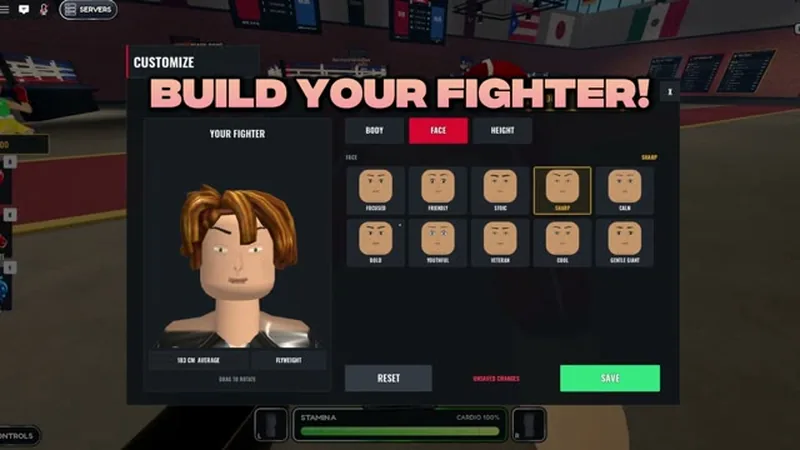
Confirmed by the official preview video: there is a CONTROLS button anchored at the bottom left of the screen, next to the stamina readout. That button opens the game's own binding reference. The preview does not hold on it long enough to read the individual keys, and no official page publishes the list.
Not confirmed anywhere: the exact key for a jab, a heavy, a slip, a high guard and a body guard. The game's own panel is the only reliable source, and it is one click away in the lobby.
That is not a dodge. A Roblox fighting game that shipped a major combat rework in mid-October will have changed bindings at least once, and a list copied from a September video is worse than no list at all. Open the panel, screenshot it, and treat that as your reference.
Roblox has a much older, much bigger boxing game called Untitled Boxing Game, and its control scheme (M1 and M2 punches, F to block, Q for the ultimate) shows up in every search for "first person boxing controls." Those bindings belong to a different experience. They do not carry over to this game, and using them will get you knocked out while you press the wrong button.
How to Find Your Bindings in Ten Seconds
The fastest path is also the one that survives patches:
- Load into the lobby.
- Look at the bottom left of the screen for the CONTROLS button.
- Open it and read the panel. It lists the bindings the build you are running actually uses.
- Screenshot it. If the game updates, compare against the screenshot rather than trusting memory.
Do this once per update. The universe was last updated on October 18, 2026, so the build you are playing is fresh and the panel is authoritative.
What the Fight HUD Tells You
The bottom of the screen is doing more work than it looks like. The official preview shows three things down there:
- STAMINA — a horizontal bar that drains as you act. The official description says getting tired slows you down, so this bar is a mobility resource, not just a punch budget.
- CARDIO — a percentage readout next to the bar, reading 100% in the preview. Treat it as the recovery side of the same system.
- Glove indicators — left and right markers at the edges, which correspond to your hands.
The practical reading is that the HUD is telling you when to disengage. If you are watching the opponent's health and ignoring your own bar, you are reading half the screen.
The Input Habits That Matter More Than the Keys
Whatever the bindings turn out to be, the same three habits decide most exchanges:
Slip, do not block, when you can
The official description separates slipping from guarding. Slips are the movement answer, guards are the static answer. A slip that works leaves you in range to counter; a guard that works leaves you safe but still on the defensive. Beginners guard by default because it is a held button, and that is why they stay trapped in exchanges.
Guard in two zones
The description says guards protect your head and your body. That means a guard is a choice about which half of you is covered, not a magic shield. If you always cover high, opponents will go low, and the fix is to change zones rather than hold harder.
Release before you are empty
The description's warning about stamina is the single most actionable line in the official text. A player who throws on an empty bar is slower than the opponent and cannot escape. The habit to build early is to end a combination with a little left in the tank, so the disengage is still available.
The slip and counter guide covers timing, and the stamina guide covers the bar in depth.
PC, Mobile and Console Input Differences
All three platforms run the same game, but the input surfaces are different enough to change how you play.
PC has the largest input vocabulary: a keyboard for the Shop and menus, plus whatever the game binds to punches and guards. It is the platform with the most room for precise inputs, and the one most guide footage is recorded on.
Mobile replaces keys with on-screen buttons. The Shop button is visible on screen rather than hidden behind B. The trade-off is that your thumbs cover part of a first-person view, which matters more here than in a third-person game because the screen is your only read on incoming punches.
Console is supported per the official description. Controllers give you triggers and sticks, which are good for movement and guard direction and worse for fast menu work.
Our platform comparison covers which one to learn on and why.
Rebinding and Sensitivity
First person combat lives or dies on look sensitivity. If your camera turns faster than you can read a punch, you will slip late every time; if it turns slower, you will lose the opponent when they step around you.
There is no published sensitivity guide for this game, and the values that work depend on your device. The practical method is to set the sensitivity so that a full stick or mouse sweep is roughly a half turn, then adjust from there after ten AI fights. Change one variable at a time.
If a guide and the in-game panel disagree, the panel is right. This page documents what is verifiable outside the game; the panel documents what the build is doing today.
Sources and Further Reading
- The official group and the in-game join reward: the official Can You Box? group
- The code tracker that documents the B-key Shop path: PCGamesN's First Person Boxing code tracker
Official source: First Person Boxing on Roblox — the official description confirms the PC, mobile and console platforms, the guards and slip system, and the stamina warning that the bar in the fight HUD represents.
Frequently Asked Questions
How do I open the Shop in First Person Boxing? Press B on keyboard, or use the Shop button on the left side of the screen on any platform.
Where are the keybinds listed? In the CONTROLS panel, opened from the button at the bottom left of the screen.
Can I play First Person Boxing on mobile? Yes. The official description lists PC, mobile and console, and the Shop is reachable through an on-screen button on touch devices.
Does the game support controllers? Yes, console is listed as a supported platform, which means the game ships with controller input.
Do the controls change between updates? The build changes often — the universe was updated on October 18, 2026 — so re-check the panel after a patch rather than assuming your old muscle memory still applies.
More First Person Boxing Guides
First Person Boxing stamina explained: the fatigue bar, cardio, why getting tired slows you down, and how to pace a fight without gassing out.
First Person Boxing styles guide: the Roll Styles screen, the five rarity tiers, the confirmed style names, drop rates and the 40-spin legendary pity.
A First Person Boxing style tier list built only from confirmed names and rarities, with what each tier means and how to judge a style yourself.